Subscription
Your CeeRent plan: what it includes, what it costs, add-ons and credits, invoices and how you pay. This is separate from your renters’ booking money, which goes straight to your own Xendit account.
- Where
- Workspace → Subscription
- Who can use it
- Owner only.
- Plans
- Every plan.
- Checked
- Sep 25, 2026
What you can do
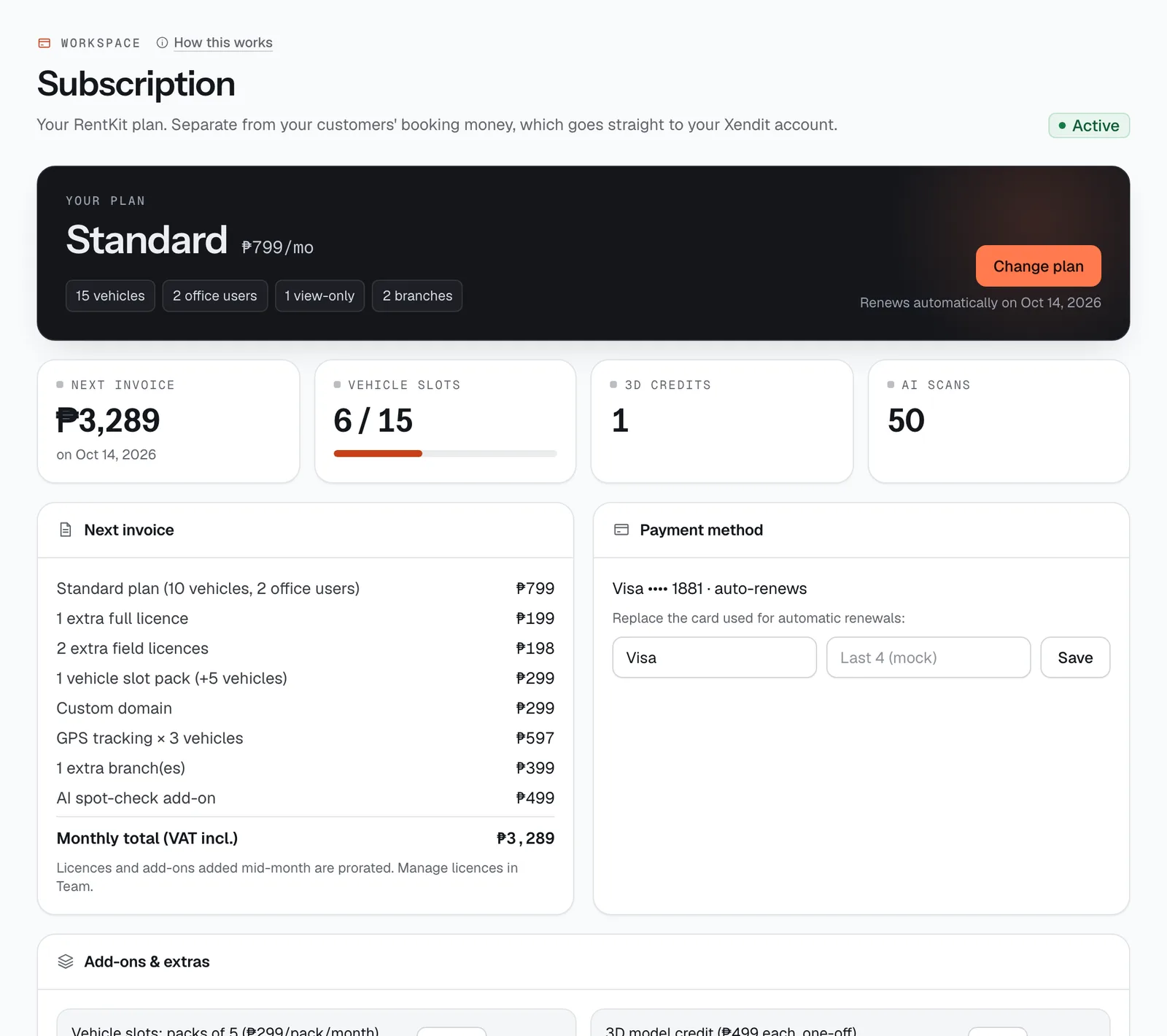
- Pick or change your plan with Change plan (during the trial, or after a failed payment, the button says Choose plan & pay).
- See exactly what your Next invoice will be, line by line, with VAT included.
- Replace the card used for automatic renewals under Payment method.
- Turn add-ons on or off in Add-ons & extras: vehicle packs, custom domain, GPS tracking and extra branches.
- Buy 3D model credits (Buy 1, Buy 3) and AI credits (+50 credits), and follow them in the Credits ledger.
- Share your referral code under Refer another operator.
- Take all your data with Export all data (JSON) or Export as CSV files, and leave with Cancel subscription.
How it works
- The badge at the top shows your status: Trialing, Active, Past Due, Paused or Cancelled.
- Four tiles show the next invoice amount, vehicle slots used, 3D credits and AI credits left (this month’s allowance and extra).
- All prices include 12% VAT. Each paid invoice gets a number like RK-SI-000123 and shows the method used. A copy is emailed to the address you give at checkout.
- Upgrading (to a more expensive plan) happens right away: you pay the difference for the days left in your current period. Downgrading, or switching between monthly and yearly, is scheduled for your next renewal. Nothing is charged today, and a badge says Switching to … on ….
- A plan change is refused if you have more active vehicles or branches than the new plan allows. Unlist vehicles, keep a vehicle pack or keep an extra-branch add-on first.
- Licences and add-ons you add mid-month are charged now for the rest of the month (prorated), then monthly. Manage licences in Team & licences.
Plans
Every plan includes every feature. Plans differ in how many vehicles, users and branches they cover. A custom domain is included on Plus and is a paid add-on on the others. Every plan includes AI credits each month for the AI skills.
| Plan | Monthly | Yearly | Vehicles | Users included | Branches | Support |
|---|---|---|---|---|---|---|
| Starter | ₱499 | ₱4,990 | 5 | 1 full | 1 | Chat & email |
| Standard | ₱799 | ₱7,990 | 10 | 2 full + 1 view-only | 1 | Chat, email & Viber |
| Plus | ₱1,999 | ₱19,990 | 25 | 5 full + 3 field + 2 view-only | 2 | Priority Viber + setup call |
Yearly billing charges 10 months and covers 12 (“2 months free”). Full details and a calculator are on the pricing page.
Free trial
New accounts get a 14-day free trial with no card needed. A banner across the dashboard shows Free trial until ….
- We remind the owner 4 days and 1 day before the trial ends, by email and by SMS to your business phone.
- Paying during the trial ends it and starts your first month (or year) that day.
- If the trial ends without a plan, new bookings pause. Your vehicles, bookings and settings all stay. Choose a plan and your booking site switches back on.
Paying, renewals and failed payments
In the plan window, under Pay with:
| Method | Monthly plans | Yearly plans |
|---|---|---|
| Card (Visa, Mastercard, JCB) | Yes, renews automatically | Yes, renews automatically |
| Maya wallet | Yes, renews automatically | Yes, renews automatically |
| GCash | No | Yes, one-time payment |
| QR Ph (any bank or e-wallet app) | No | Yes, one-time payment |
| Bank transfer (InstaPay / PESONet) | No | Yes, one-time payment |
With GCash, QR Ph or bank transfer we remind you before the year is up, and you pay the renewal from this page. Fill in Invoice details (BIR): the registered name and an email for invoices are required; TIN and address are optional.
If an automatic renewal fails:
- The status becomes Past Due, the owner gets an email, and we retry the card on days 1, 3, 7 after the failure. You can press Retry payment now after updating the card.
- After 14 days unpaid, new bookings pause. Existing bookings, handover checks and data export keep working.
- A final notice goes out 7 days before closing. After 90 days unpaid the account closes and the booking site goes offline.
Add-ons and credits
| Add-on | Price | Notes |
|---|---|---|
| Vehicle slots | ₱299 per pack of 5 a month | To remove a pack, your active vehicles must fit in what’s left. |
| Custom domain | ₱299 a month | Included on Plus. Set up the domain in Website & widget. Turning it off sends your site back to yourname.ceerent.com. |
| AI credits | ₱399 per pack of 50, one-off | Plans include Starter 20, Standard 50, Plus 150 a month (a trial 20), topped back up every 30 days. Packs don’t expire. See AI skills & credits. |
| GPS tracking | ₱199 per vehicle a month | On every plan. You buy the tracker. Remove the tracker ID from the vehicle before removing the add-on. |
| Extra branches | ₱399 per branch a month | Plans include Starter 1, Standard 1, Plus 2. |
| 3D model credit | ₱499 each, one-off | One credit makes one 3D model. |
Credits are non-refundable and don’t expire while you’re subscribed. A 3D credit comes back if a model can’t be made. Every purchase, use and refund of credits is listed in the Credits ledger.
Referrals. Share your code from Refer another operator. When the operator you referred becomes a paying customer, you get 2 free 3D credits and they get 1.
Exporting your data and cancelling
Your data is yours. In the Leave CeeRent box at the bottom:
- Export all data (JSON) downloads one file with your vehicles, customers, bookings, ledger, refunds, receipts, subscription invoices and every published version of your booking site.
- Export as CSV files downloads one spreadsheet file per table, ready for Excel or Google Sheets.
Only the owner can cancel. Cancel subscription shows what will happen before you press Confirm cancellation:
- Your site stays online until the end of the period you paid for, then goes offline. Your data is deleted 90 days after that. Your CeeRent invoices are kept.
- If bookings run past that date, you can cancel them all with full refunds in one step (Cancel … with full refunds), or keep them if you’ll finish them first.
- Yearly plans cancelled within 30 days of starting are refunded for the unused months. Months used are charged at the monthly price, and a part-month counts as a full month. After 30 days there is no refund.
- Changed your mind? Keep my subscription undoes the cancellation while the site is still online.
Still not sure how it works?
Ask a person, in Filipino or English — Mon–Sat, 8:00–20:00 PHT.