Settings
How your business runs on CeeRent: your business details, the Verified by CeeRent badge, branding, the rules every booking follows, your payment account, branches and the languages your booking site speaks.
- Where
- Workspace → Settings
- Who can use it
- Owners and managers. Only the owner can connect or change the payment account.
- Plans
- Every plan. Branches included: Starter 1, Standard 1, Plus 2; extra branches are ₱399 a month each.
- Checked
- Sep 25, 2026
What you can do
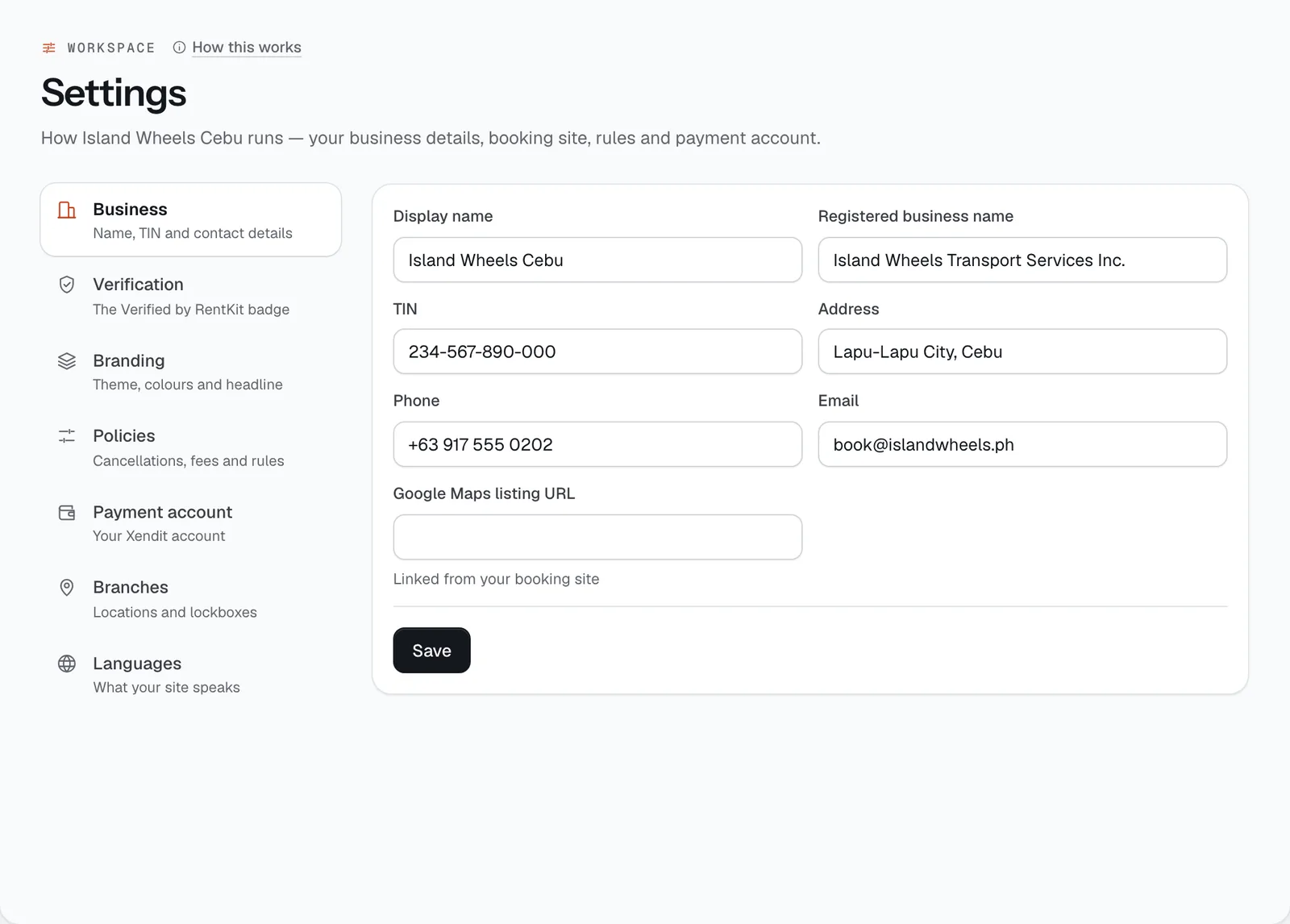
- Keep your name, TIN and contact details current in Business.
- Upload your permits for the Verified by CeeRent badge in Verification.
- Set colours, logo initials and tagline in Branding.
- Set cancellation, deposit, fee and pickup rules in Policies, then Save policies.
- Connect your own Xendit account in Payment account.
- Add branches and set up key lockboxes for self pickup in Branches.
- Choose which languages your booking site offers in Languages.
How it works
- Settings has seven tabs, listed down the left side on a computer and as tabs across the top on a phone.
- Policy changes apply to new bookings only. Each booking keeps the policy that was in force when it was made, and renters always see the rules of their own booking.
- Every save is recorded in the audit log, with which policy fields changed.
Business
What you rent. Tick everything that applies — Self-drive cars, Scooters & motorbikes, Wedding & event cars, Chauffeur & airport transfers, Van day tours, Monthly, TNVS & company — and press Save. CeeRent sets starting rules to match: for example wedding cars take no deposit and a 30% reservation fee with the balance a week before; chauffeur and tour vehicles go out with your driver; scooter shops get a no-deposit waiver. It also sets what Add a vehicle starts with and the site theme suggested during setup. It only changes rules you haven’t changed yourself, and tells you which it set and which it kept.
Fill in Display name (what renters see), Registered business name (printed on your receipts, rental terms and checkpoint letters), TIN (printed on your receipts), Address, Phone, Email, and your Google Maps listing URL, which your booking site links to. Press Save.
Your phone number is also what renters call from their trip page, and what an officer calls when they scan a checkpoint QR.
Verification (the Verified by CeeRent badge)
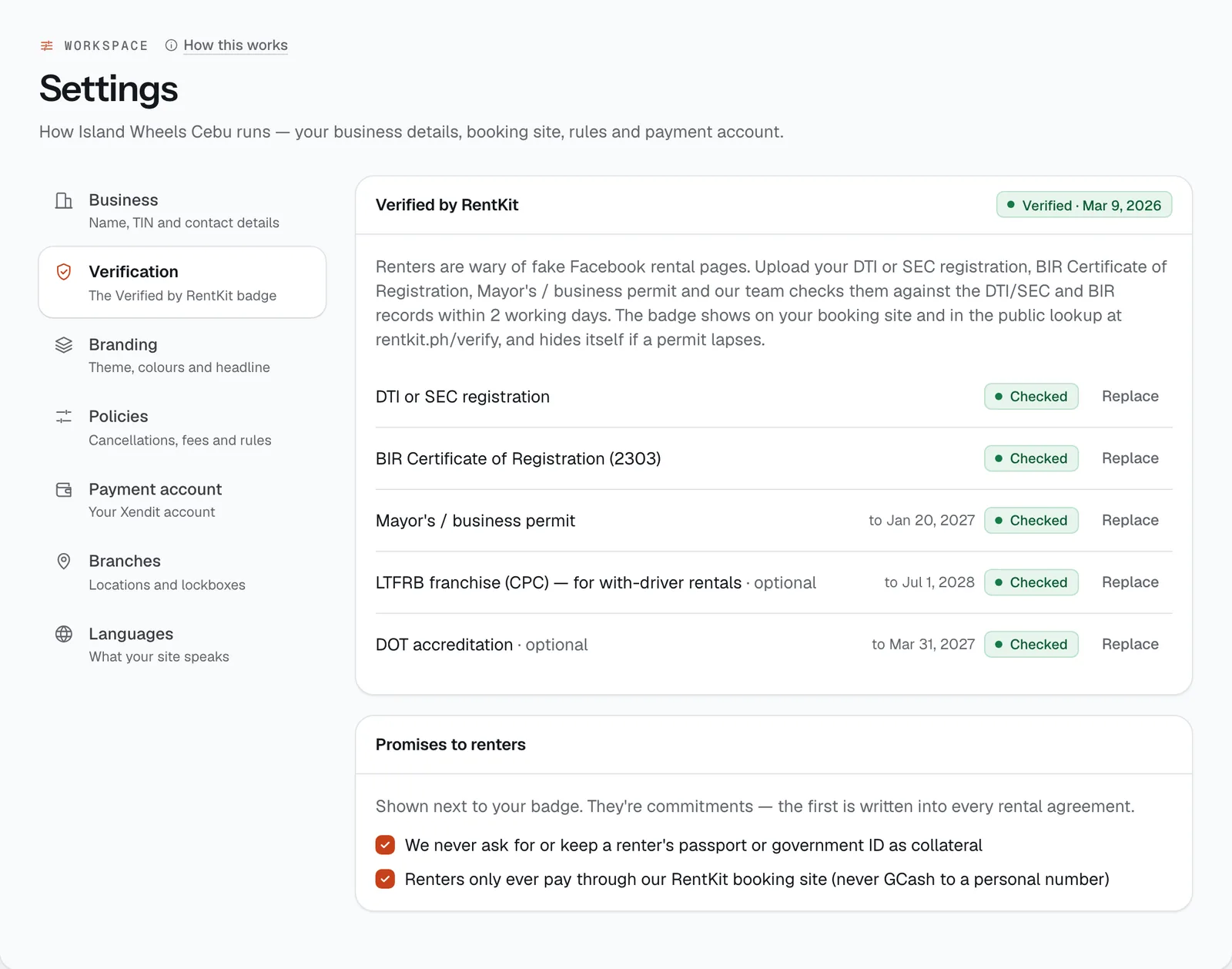
Renters are wary of fake Facebook rental pages that take a GCash “reservation fee” and disappear. The badge shows them a real team checked your papers.
Required for the badge:
- DTI or SEC registration
- BIR Certificate of Registration (Form 2303)
- Mayor’s / business permit
Optional: LTFRB franchise (CPC), for with-driver rentals, and DOT accreditation.
For each paper press Upload (or Replace), add a photo or scan, the registration or permit number (the TIN for the 2303) and the Valid until date where there is one, then Send for checking. The page says our team checks papers within 2 working days.
Each paper shows its status: Not uploaded, Being checked, Checked, Needs another look (with the reason, so you can fix it) or Expired.
- When all three required papers are checked, you’re Verified. The badge shows on your booking site, on your payment-link and quote pages, and in the public lookup at ceerent.com/verify.
- We warn you 30 days before a permit expires. If a required paper lapses, the badge hides itself until you upload the renewed one.
Promises to renters. Two optional commitments, shown next to your badge: “We never ask for or keep a renter’s passport or government ID as collateral” (also written into every rental agreement) and “Renters only ever pay through our CeeRent booking site”. With the second one on, checkout also tells renters to pay only on that page.
Branding
Set your City, Logo initials (up to 3 letters), Tagline, Primary colour (used on emails, receipts and your app icon, and as a starting point for your site’s palette) and Accent colour. Press Save, or Preview site to look.
Your city also picks the built-in road trips on your vehicle pages (see Trip destinations below).
The theme, headline, photos and pages of your booking site are designed in the Site Builder (Open Site Builder). Your site address is shown at the bottom of this tab. A custom domain is set up in Website & widget.
Policies
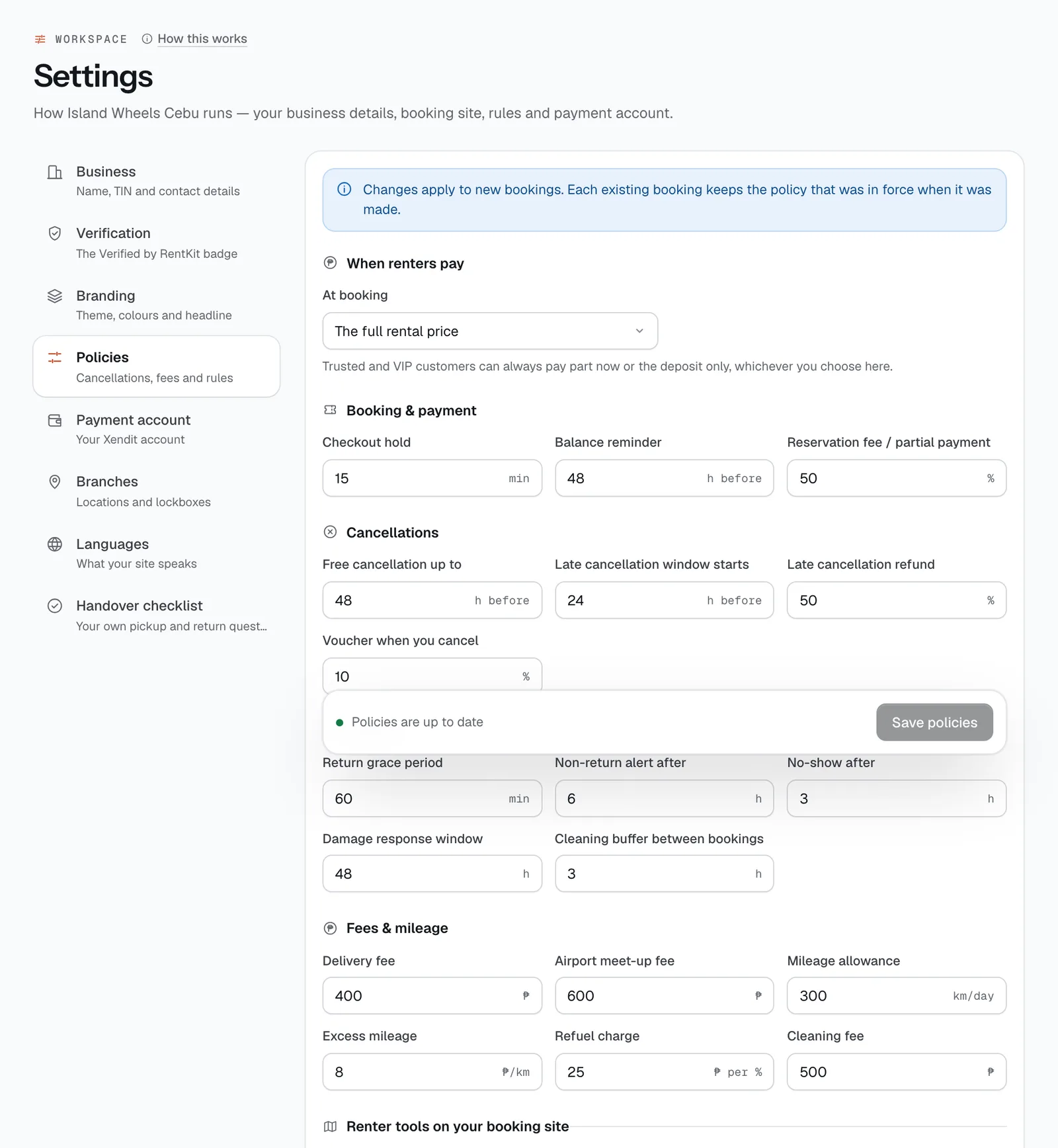
The rules CeeRent applies to every new booking. Each number field shows its unit. Changes stay unsaved until you press Save policies (or Discard). The defaults are shown in brackets.
Booking & payment
- Checkout hold (15 min): how long a vehicle is reserved while the renter pays. If they don’t pay in time the hold expires and the vehicle is free again. Must be 5–60 minutes.
- Balance reminder (48 h before): renters who haven’t paid in full get one reminder this long before pickup, saying how much is due at pickup.
- When renters pay: The full rental price at booking (the default), or A reservation fee, the rest later — every renter pays the reservation share now, and the balance At pickup or Before pickup, by payment link (the link goes out at the Balance reminder time, once your payment account is verified). Wedding and event bookings usually work this way.
- Reservation fee / partial payment (50%): the share paid now. Customers you’ve marked Trusted or VIP can always pay this share (or only the deposit) even when everyone else pays in full.
Cancellations
- Free cancellation up to (48 h before pickup): a full refund if the renter cancels earlier than this.
- Late cancellation window starts (24 h before) and Late cancellation refund (50%): cancelling between the two times gets this share back. Closer to pickup than the late window, there’s no refund. The late window must be shorter than the free window.
- Voucher when you cancel (10%): when you cancel, the renter always gets a full refund. You can also tick Add a 10% voucher for next time: a one-use promo code worth this share of the booking total.
The renter’s deposit is always released when a booking is cancelled.
Returns
- Return grace period (60 min): after the return time plus this, the booking turns Overdue and late charges start: the hourly rate, never more than one day’s rate for each day late.
- Non-return alert after (6 h): if an overdue vehicle still isn’t back this long after the return time, you get a “Possible non-return” alert.
- No-show after (3 h): if the renter hasn’t picked up this long after the pickup time (plus any flight delay for airport meet-ups), the booking becomes a no-show. The rental isn’t refunded and the deposit is released.
- Damage response window (48 h): how long a renter has to accept or dispute charges you propose after a return. If they don’t respond, the charges stand.
- Cleaning buffer between bookings (3 h): blocked automatically after every booking so there’s time to clean and check the vehicle. Renters can’t book into it, and the calendar shows it.
Fees & mileage
- Delivery fee (₱500): the price to deliver to the renter’s address and collect it at the end, when you have no delivery zones (see below).
- Airport meet-up fee (₱800): added when a renter chooses an airport meet-up.
- Mileage allowance (300 km/day) and Excess mileage (₱8/km): at return, kilometres above the allowance for the trip are proposed as a charge.
- Refuel charge (₱25 per %): charged for each percent of fuel (or battery, for electric cars) missing at return, compared with the reading at pickup.
- Cleaning fee (₱500): kept with your policies. CeeRent doesn’t add it to bookings by itself.
Renter tools on your booking site
- Minimum age, cars (21) and Minimum age, motorcycles (18): the youngest renter you accept, between 16 and 99. Used by the “Can I rent this?” check on your vehicle pages.
- Gasoline (₱/L), Diesel (₱/L) and Charging (₱/kWh): local pump prices for the road-trip cost planner. Renters see the date you last set them, and it updates whenever you change a price.
Rules and options
- Refund unused days on early return (off): when a vehicle is out on rent, the booking tells your staff whether unused days are refundable if it comes back more than a day early. When off, they aren’t, but you can still give a goodwill refund. Your rental terms tell renters which applies.
- Typhoon rule: free reschedule or full refund when a PAGASA signal is raised (on): CeeRent’s own team raises PAGASA wind signals by area. Renters with a pickup there see a notice on their booking page and can move their dates for free or cancel for a full refund themselves.
- Allow inter-island travel (RoRo) (off): when off, RoRo add-ons are hidden from your booking site and the agreement says the vehicle may not leave the island without written permission.
- Check every licence with LTO (2600 SMS or eLicense QR) before approving (off): when on, staff can’t approve a renter’s licence until a matching LTO check is recorded.
- Walkaround video at handover: Off, Optional (replaces corner photos on cars) or Required.
- Checkout recovery (off): one reminder to a renter who left a booking unpaid, a set number of minutes after the hold expires (10–1,440), with a link back and an optional comeback promo code. Renters can turn these reminders off in their account.
- Take part in the shared renter watchlist (off): see serious, evidence-backed reports from other operators, shared as codes only. Listed renters are told and can appeal to CeeRent.
Extra cover through our insurance partner
Turn on Personal accident cover and 24/7 roadside assistance, each with a price per day. Renters can add them at booking, and the policy is issued when they pay. You keep a 20% commission; the rest is logged as an insurance expense to remit.
With-driver bookings
When your driver takes the car out, the renter is a passenger. They aren’t asked for a licence or selfie, the handover needs five photos (four sides and the dashboard) instead of ten, there’s nothing for them to sign or confirm on their phone, and the trip starts when you submit the pickup check. You do need to Assign driver on the booking first — a driver, field staff, a manager or you. At return, fuel, RFID tolls and kilometres are your running costs: tick Charge missing fuel, Charge RFID tolls or Charge kilometres over the allowance to pass them on. Time past the booking shows as overtime. Only book a driver on units with an LTFRB franchise and for-hire plates is the same switch as on LTFRB & LTO.
What’s included & cover
Your insurance, in one line is shown on every vehicle page and in the agreement — write what you actually have (“CTPL + comprehensive, ₱5,000 participation fee”). New accounts start with it empty, so renters aren’t promised cover you don’t carry. Tick Unlimited kilometres and Second driver free if they apply. Set the Prepaid rate discount (%) (0 to not offer it), your Long-rental discounts (e.g. 7 days or more: 12% off), and the protection tiers renters choose from: the first is what’s included (₱0 a day); each upgrade has a price per day, the most a renter pays for damage, and what it covers.
One-way returns
Let renters return at another branch for a Base fee (₱) plus Per km between branches (₱). Renters pick the return branch on the vehicle page and see the one-way fee there.
Delivery zones
Price delivery by road distance from your nearest branch. Each zone has a Name, Up to (km) and Fee (₱); add more with Add zone. Addresses beyond your last zone can’t book delivery. With no zones, the flat delivery fee applies everywhere. The fee always covers drop-off and collection.
Deposits
Choose how you take a security deposit — every operator does it differently:
- No deposit: renters pay the rental only. Your booking site, checkout, agreement and messages stop mentioning a deposit, and damage or other charges are billed after the trip by payment link.
- Online (the default): card and Maya deposits are held at pickup, not charged, and released after a clean return. GCash, QR Ph and other methods can’t be held, so the deposit is charged with the booking and refunded.
- Cash at pickup: nothing is taken online. At pickup the handover screen tells your staff to count the deposit in cash; it goes into their cash drawer, and it’s handed back in cash at a clean return (or what’s left after confirmed charges). Renters can’t use lockbox self pickup, because someone has to take the cash.
Set Default for cars (₱) and Default for motorcycles (₱); every vehicle uses the default for its type unless you give it its own amount on the vehicle. Tick No deposit when our driver goes along if with-driver bookings shouldn’t carry one. Given back within (24 h of a clean return) is your promise to renters: they see it on your vehicle pages and follow a countdown on their booking page. You get a reminder before the deadline, and if you miss it the booking shows up in Today under To review, and the renter sees that it’s late.
No-deposit option
Shown when you take deposits. Let renters pay a daily non-refundable waiver instead of the deposit. You set Waiver per day (a % of the vehicle’s deposit, 1–20), At least (₱/day), Only if deposit is at most (₱), and whether it’s for cars, motorcycles or both. High-risk bookings are still asked for a deposit at pickup, and damage or other charges are billed after the trip by payment link.
Trip destinations
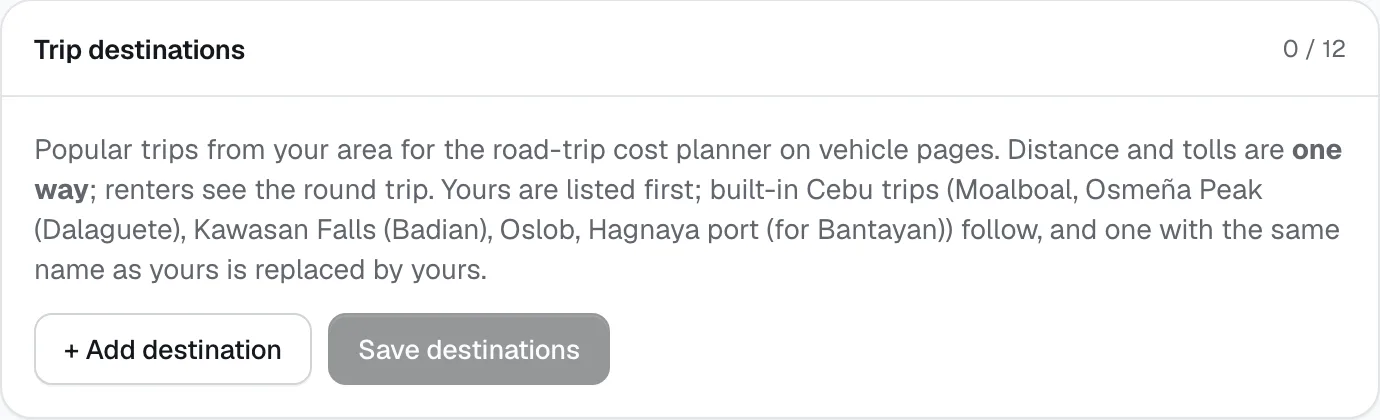
Below the policies, add up to 12 popular trips from your area for the road-trip cost planner on your vehicle pages: Destination, kilometres and tolls (one way, since renters see the round trip) and a Note for renters. Distance must be 1–1,500 km and tolls ₱0–₱5,000. Yours are listed first; built-in trips for your city follow. Press Save destinations.
Payment account
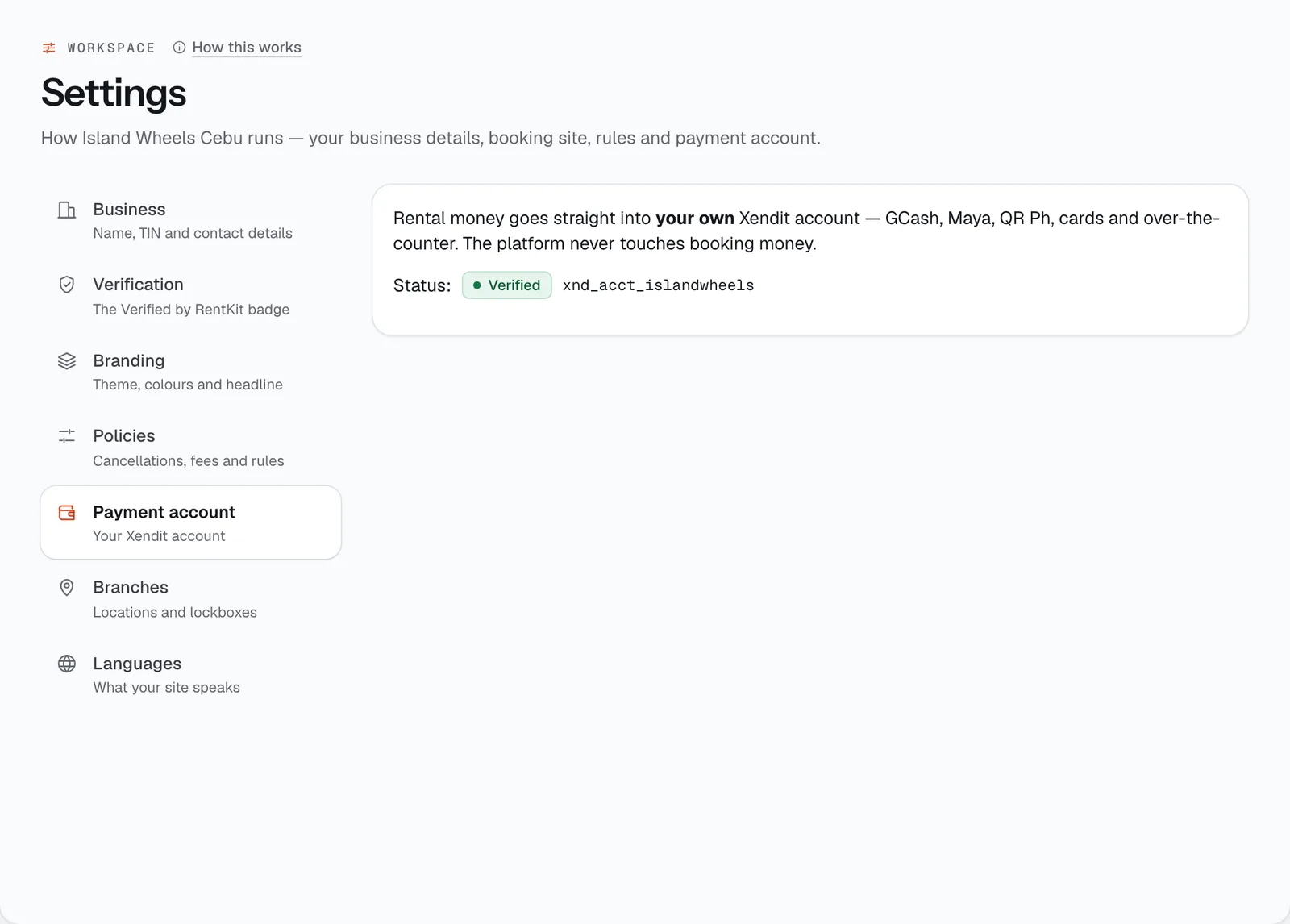
Rental money goes straight into your own Xendit account: GCash, Maya, QR Ph, cards and over-the-counter. CeeRent never holds your booking money.
The status shows one of three states:
- Not connected: press Turn on online payments and CeeRent opens your Xendit account for you.
- Pending: your account exists. Finish Xendit’s own verification of your identity and business with Complete Xendit verification.
- Verified: you can take payments. Your account ID is shown next to the status.
Only the owner can connect or change the payment account. Managers see the status only. For how money moves after that, see Payments & refunds.
Branches
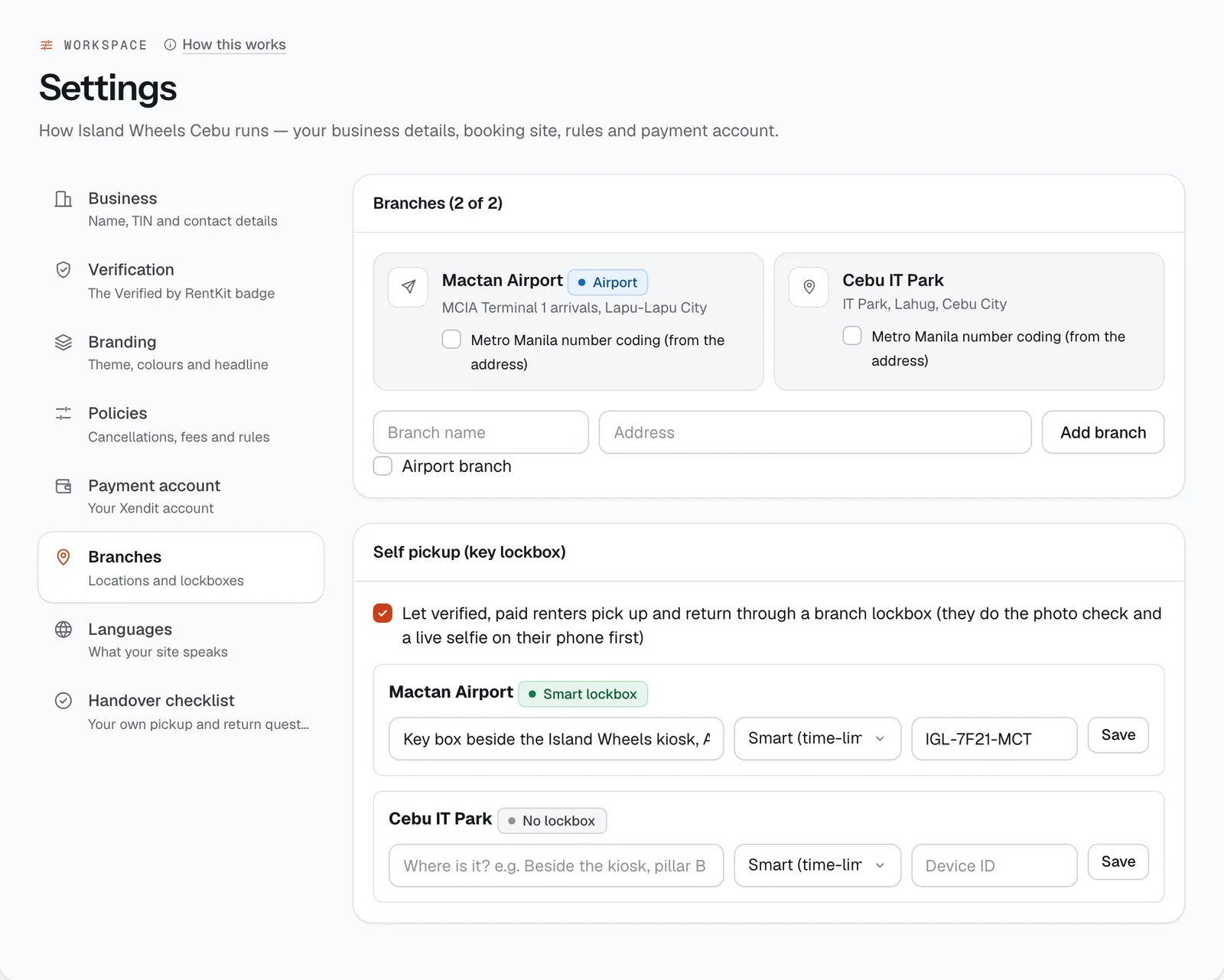
The card title shows how many branches you have out of your limit, for example Branches (2 of 2). To add one, type a Branch name and Address, tick Airport branch if it is one, and press Add branch.
Plans include Starter 1, Standard 1, Plus 2 branches. Need more? Add an extra branch for ₱399 a month in Workspace → Subscription first.
Branches are your pickup points on the booking site, the start point for delivery distances, and the choices for one-way returns and for limiting staff to a branch.
Metro Manila number coding is ticked by itself for branches in Metro Manila (Makati, BGC, Pasay, Quezon City and the rest). Cars from those branches show their coding day on the vehicle page and the renter’s booking; cars from Cebu, Bohol or Siargao don’t. Untick or tick it to override.
Self pickup (key lockbox). Tick Let verified, paid renters pick up and return through a branch lockbox to let renters collect the key themselves. For each branch, say where the box is, pick the type and press Save:
- Smart (time-limited codes) with its device ID: each booking gets its own one-time code.
- Combination (4–8 digits): one shared code. Change it after every rental.
Self pickup opens 30 minutes before the pickup time. Before they get a code, renters sign the agreement, photograph the vehicle and take a live selfie on their phone. It isn’t offered for delivery, airport or with-driver bookings, for unverified or unpaid renters, for high-risk bookings until you’ve reviewed them, or when the deposit isn’t on a card or Maya (or already paid). For the renter’s side, see What your renters see.
Languages
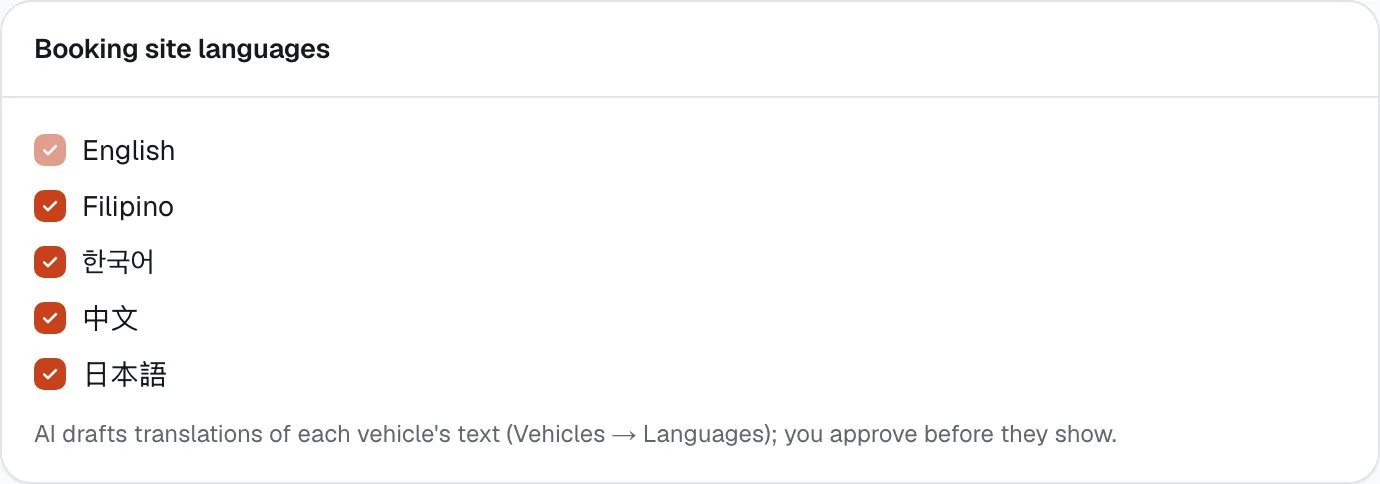
Tick the languages your booking site offers: English (always on), Filipino, Korean (한국어), Chinese (中文) and Japanese (日本語). Renters switch language from the menu at the top of your site.
The switcher translates the site’s menu and booking buttons, plus each vehicle’s description once you approve a translation. AI drafts the translations in Fleet → Vehicles → a vehicle → Languages, and nothing shows until you approve it.
- DTI or SEC registration
- Replace
- Promises to renters
- Checkout hold
- Cancellations
- When renters pay
- + Add destination
- Add branch
- Self pickup (key lockbox)
Still not sure how it works?
Ask a person, in Filipino or English — Mon–Sat, 8:00–20:00 PHT.