Dashboard · Workspace
Sent messages
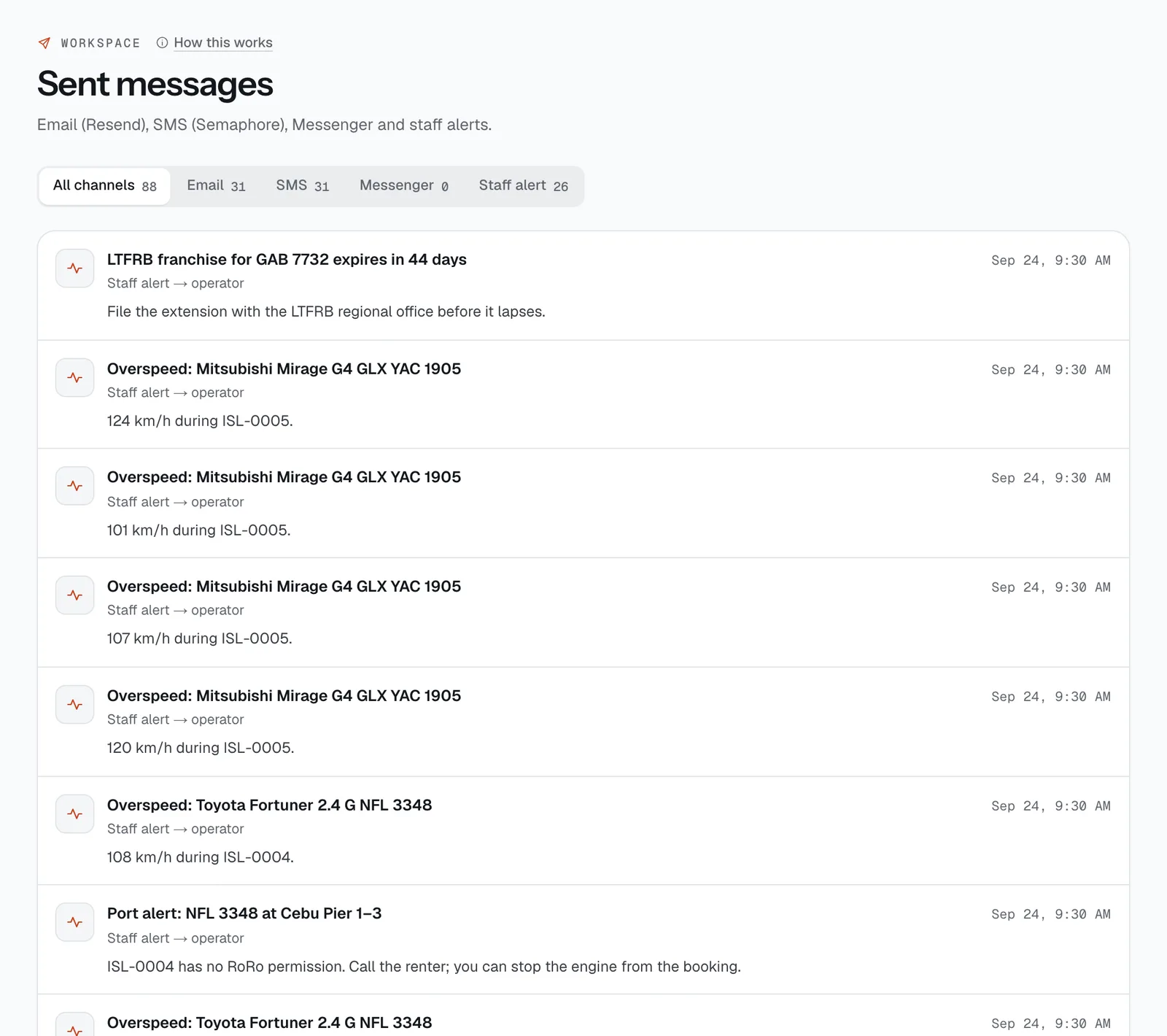
A copy of every email, SMS, Messenger message and staff alert CeeRent sent for your business, so you can check what a renter was told and when.
- Where
- Workspace → Sent messages
- Who can use it
- Owners, managers and front desk.
- Plans
- Every plan.
- Checked
- Sep 25, 2026
What you can do
- See everything that went out, newest first, with the subject, time, channel, recipient and message.
- Filter by All channels, Email, SMS, Messenger or Staff alert. Each shows its count.
- Check that a renter got their confirmation, pickup reminder, deposit update or charges to review before they say “wala pong dumating”.
How it works
- CeeRent sends these by itself: booking confirmations, “Pickup tomorrow” reminders, balance-due reminders, overdue notices, charges to review, refunds and deposit updates, lockbox codes, invites to your staff, and your own subscription emails.
- Staff alerts are the notices CeeRent sends your team, like “Possible non-return”, a deposit past your release promise or a support access request.
- The page shows the latest 200 messages for the channel you pick. It’s a record only; to reply to a renter, use the Inbox.
- An empty page says Nothing sent yet.
Still not sure how it works?
Ask a person, in Filipino or English — Mon–Sat, 8:00–20:00 PHT.