Inbox
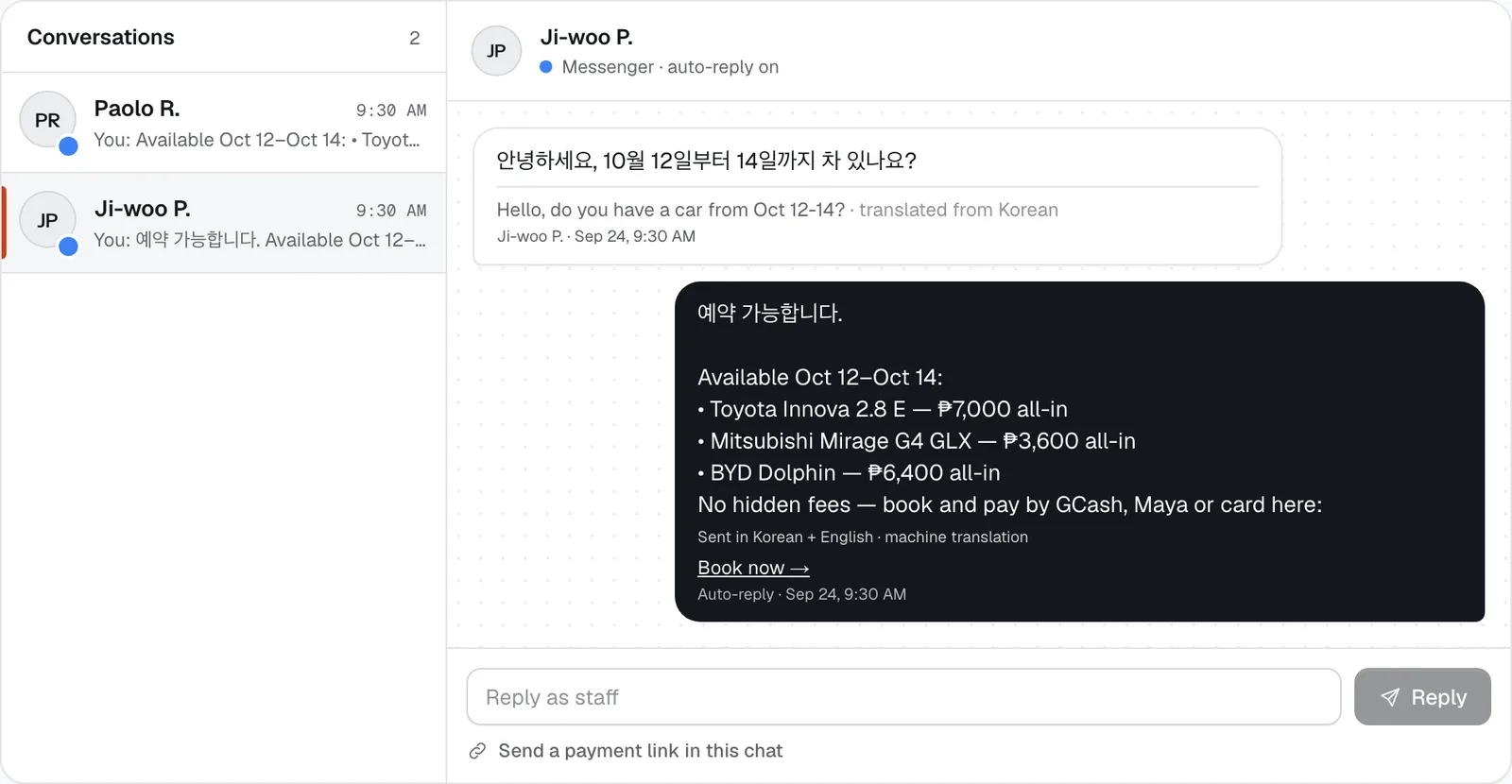
Facebook Messenger, Viber, WhatsApp and your website’s contact form in one place. An auto-reply answers date and price questions straight away with live prices and a booking link, and you can step in any time.
- Where
- Customers → Inbox
- Who can use it
- Owners, managers and front desk can read and reply. Only owners and managers can connect Facebook, Viber or WhatsApp.
- Plans
- Every plan.
- Checked
- Sep 25, 2026
- Translation
- Reply as staff
- Send a payment link
What you can do
- Connect your Facebook page with Connect Facebook page, then connect Viber and WhatsApp with Connect.
- Read every conversation in one list. A coloured dot shows where it came from: Messenger, Viber, WhatsApp or Website.
- Answer in the Reply as staff box and press Reply.
- Get paid in the chat with Send a payment link in this chat.
- Read Korean, Chinese and Japanese messages in English, and reply in English — the renter gets it in their language.
- Answer questions sent through the contact form on your booking site.
How it works
- Until your Facebook page is connected, this page only shows Connect Facebook page. Connect it first, then the Inbox, the Viber and WhatsApp cards and your conversations appear.
- The auto-reply answers every new message on Messenger, Viber and WhatsApp, day or night, including messages that come in after you’ve replied yourself. There’s no setting to pause it. Website contact-form messages don’t get an auto-reply.
- Every auto-reply also goes out in the chat app, and your replies go back through the same app the renter used.
Connecting your chat apps
- Facebook Messenger: Connect Facebook page. Messages to your page then arrive here.
- Viber: type your Viber business or bot name in the Viber card and press Connect. Viber is the business chat app most Filipinos use.
- WhatsApp: type your WhatsApp Business number (a Philippine mobile, +63 9xx…) and press Connect. Many foreign tourists message this way.
Each card shows connected and the page, bot or number once it’s linked. Only owners and managers can connect apps.
What the auto-reply understands
The auto-reply looks for dates first, then price words. It does not understand a bare avail po?
or available?
— without dates it just asks for them.
Dates it reads (pickup is taken as 10:00 AM):
- A month and a day range:
Oct 3-5
,oct 3 to oct 6
,Oct 30 – Nov 2
,Oct 3 hanggang 5
. A month earlier than this one means next year. - Tomorrow:
tomorrow
orbukas
, for 1 day, or longer with a number:bukas 3 days
,bukas 2 araw
. - A weekday in English or Filipino:
sa Sabado
,this friday
,Lunes 2 days
. It means the next one coming (if today is Saturday, “Sabado” is next week’s). Watch out:linggo
is read as Sunday, even when the renter means “week”. weekend
: the coming Saturday for 2 days.
With dates, it checks your fleet and replies with up to 4 vehicles free for those dates and each one’s all-in price (for branch pickup, without add-ons or driver), plus a booking link with the dates already filled in. If nothing is free, it says you’re fully booked and links to your site to try other dates.
Without dates but with a price word — hm
, hm po?
, magkano
, how much
, rate
, rates
, price
or presyo
— it lists your 4 cheapest vehicles with their “from ₱…/day” rates and asks for dates, with a link to your site.
Anything else gets a greeting that asks which dates they need, with a link to your site.
Cars or scooters. If the message mentions a scooter (motor
, scooter
, click
, nmax
, bike
), only motorcycles are listed. If it mentions a car (car
, kotse
, sedan
, suv
, van
, innova
), only cars are listed.
Korean, Chinese and Japanese
- Messages in Korean, Chinese or Japanese are translated into English under the original, marked “translated from Korean” (or Chinese, Japanese). A ≈ in front means the translation is rough.
- The auto-reply reads the English translation, so dates in those languages work too. Its answer is sent in the renter’s language with the English underneath.
- Write your own replies in English. The renter gets them in their language with your English kept below, marked as machine translation.
- Filipino and Taglish aren’t translated — you read them as they are.
Sending a payment link in a chat
Once your payment account is connected (Settings → Payment account), each conversation has Send a payment link in this chat. Type what it’s for (for example “Reservation Oct 3–5”) and the amount (at least ₱20), then Send link. The renter gets a message with a secure link to pay, valid for 24 hours. See Payment links for how links are paid and tracked.
Messages from your website
If your booking site has a Contact section with its form (added in Site Builder), messages sent through it land here as a Website conversation — one per email or mobile. You get a staff alert. If they gave an email, the sender gets a note that you’ll reply soon.
There’s no chat app on the other end, so when you reply, your answer is emailed to them (or sent by SMS if they only left a mobile number).

- Connect Viber
- Connect WhatsApp
Still not sure how it works?
Ask a person, in Filipino or English — Mon–Sat, 8:00–20:00 PHT.