Answer Messenger, Viber and WhatsApp with auto-reply
Bring your chats into one Inbox, let the auto-reply answer date and price questions with live availability, and step in to reply or send a payment link.
- Time
- 10 min · 6 steps
- Plans
- Every plan.
- Where
- Customers → Inbox
- Checked
- Sep 25, 2026
Connect your chat channels
Open Customers → Inbox. First tap Connect Facebook page. Then, if you use them, type your Viber business or bot name and your WhatsApp Business number (a Philippine mobile) and tap Connect on each.
Messages from the contact form on your booking site land here too, marked Website; your replies to those go back by email or SMS. Owners and managers connect channels; front desk staff can answer.

- Viber
Know what the auto-reply understands
The auto-reply answers every incoming message straight away, day or night. It looks for dates and price words — nothing else:
Renter types CeeRent replies avail po?
hello
pwede mag-rent?
Asks “Which dates do you need? (e.g. “Oct 3-5”)” and links your booking site. A bare “avail po?” has no dates, so this is the answer it gets. hm po?
magkano?
how much
rates
presyo
Lists up to four vehicles, cheapest first, “from ₱…/day”, and asks for their dates. Oct 3-5
oct 3 to oct 6
Oct 3 hanggang 5
Checks the fleet for those dates and lists up to four free vehicles with the all-in price, plus a booking link with the dates already filled in. bukas
tomorrow 3 days
bukas 2 araw
The same, from tomorrow 10 AM — for one day, or the number of days they wrote. sa Sabado
this friday
Linggo 2 days
The same, from the coming day they named. this weekend
The same, Saturday 10 AM to Monday 10 AM. Also says motor
scooter
nmax
click
bike
Lists motorcycles only. Also says kotse
car
sedan
SUV
van
Innova
Lists cars only. Dates when nothing is free Says you’re fully booked for those dates and links your site to try others. Watch it answer
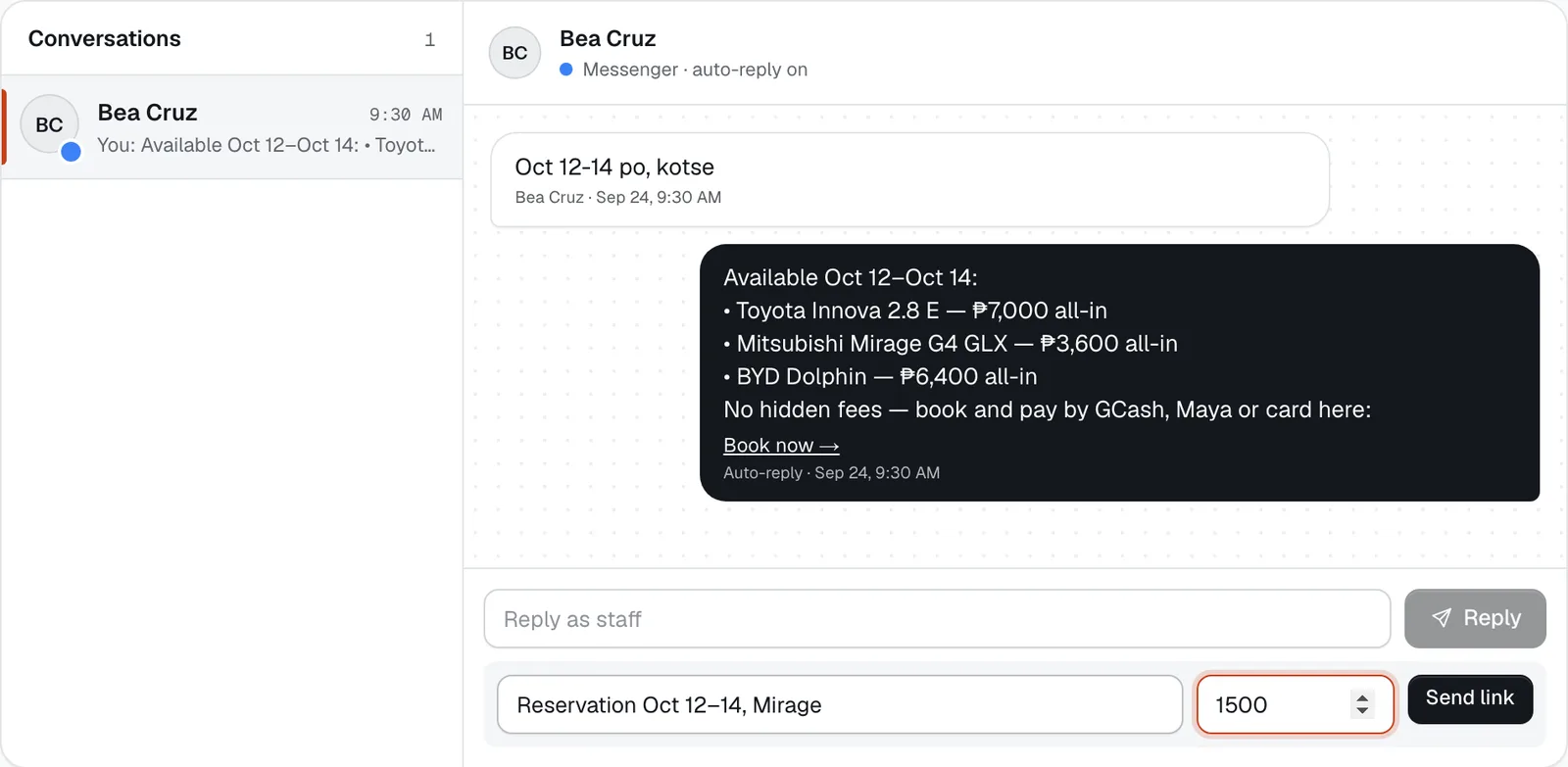
Each chat shows the renter’s messages and the replies marked Auto-reply. The Book now → link opens your booking site with their dates filled in, so they only choose a vehicle and pay.
Messages in Korean, Chinese or Japanese are translated for you underneath, and the auto-reply goes back in their language with the English below it.
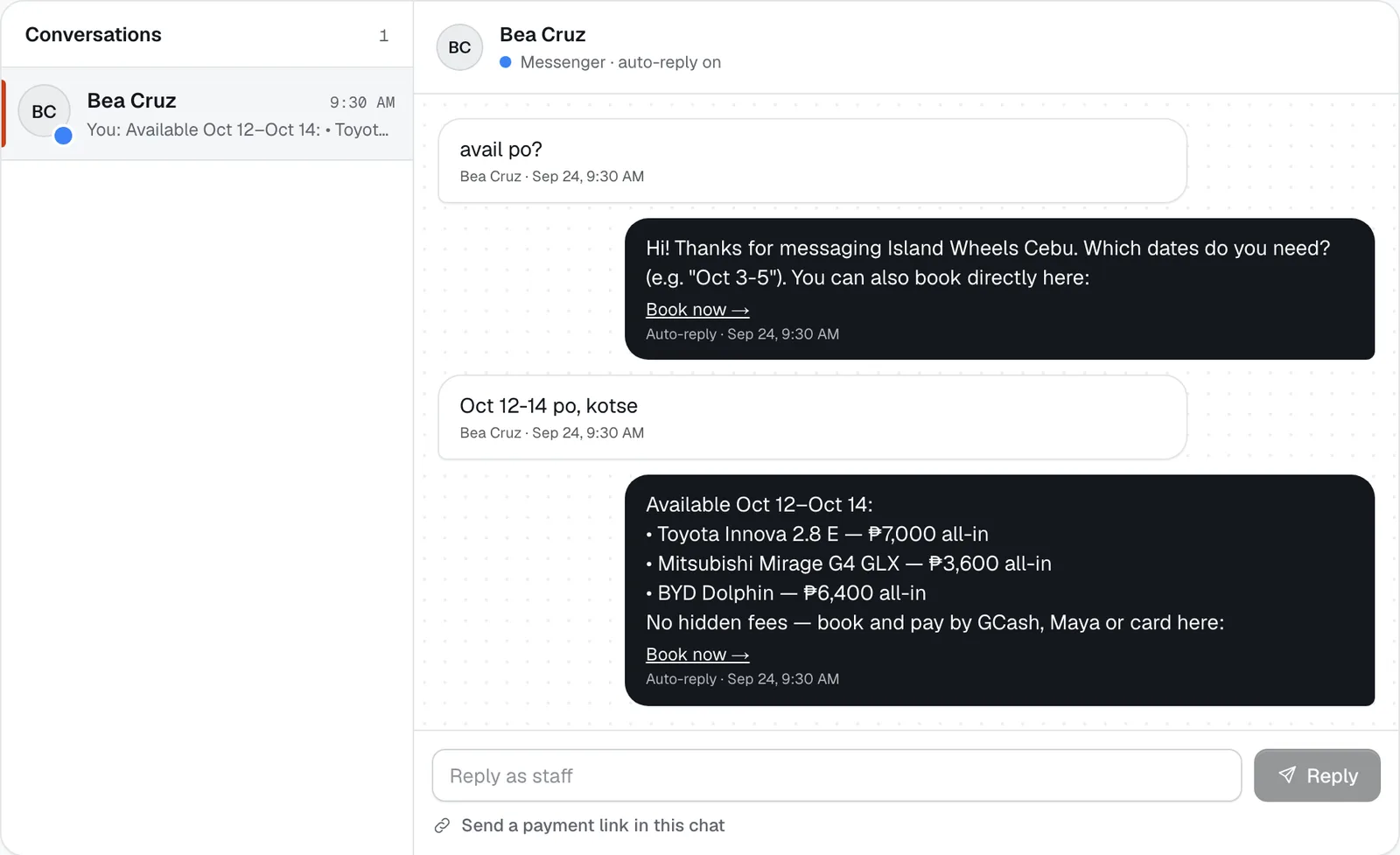
- No dates yet: asks which dates
- Dates: free vehicles, all-in price
- Booking link with the dates filled in
Reply as staff
Type in Reply as staff and tap Reply. Write in English or Filipino — renters who wrote in Korean, Chinese or Japanese get a machine translation with your original under it.
The auto-reply keeps answering every new message, even in a chat you’ve joined. Use your replies for what it can’t do: times of day, specific models, directions, special requests.
Send a payment link in the chat
Under the reply box, tap Send a payment link in this chat. Fill in what it’s for (e.g. “Reservation Oct 12–14, Mirage”) and the amount, then tap Send link. It appears in the chat with a Pay now → link, open for 24 hours. This needs your payment account verified.
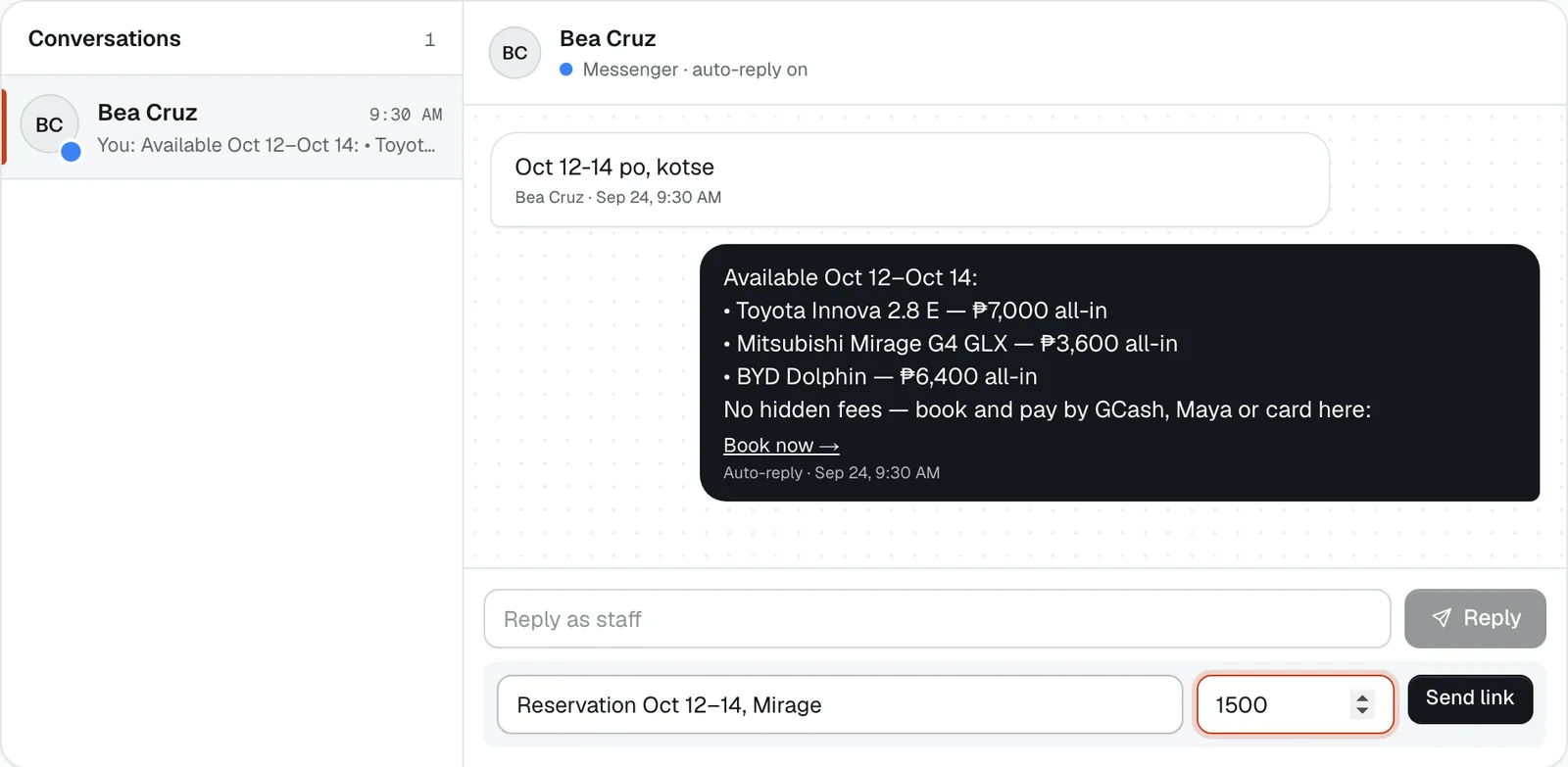
- Reply as staff
- What for
- Amount
- Send link
Hold the car while they pay
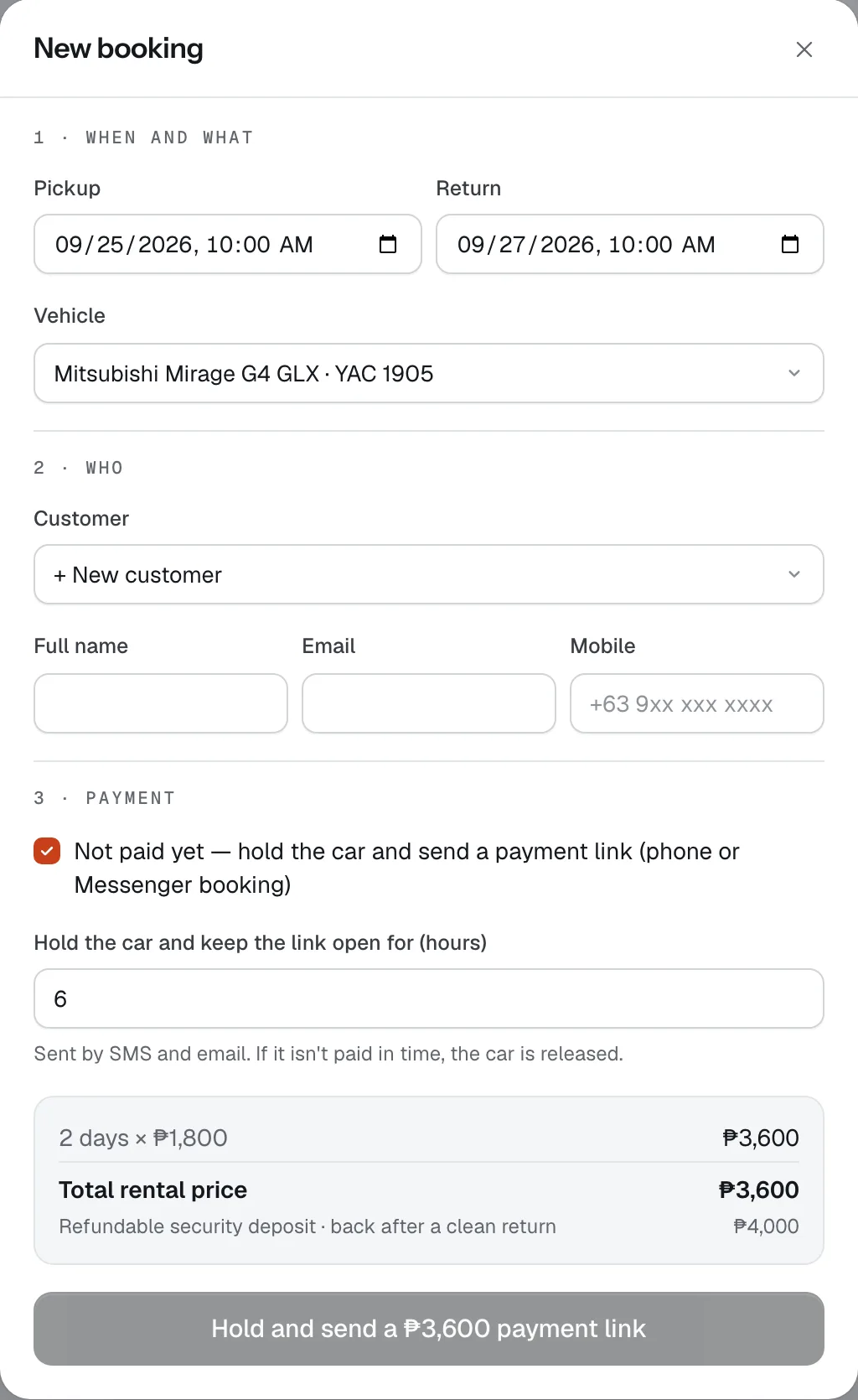
A chat link on its own doesn’t hold a vehicle. To keep the car for them, create the booking in Bookings → New booking and tick Not paid yet — hold the car and send a payment link (phone or Messenger booking). The car stays held until the link expires, and the booking confirms itself when they pay.
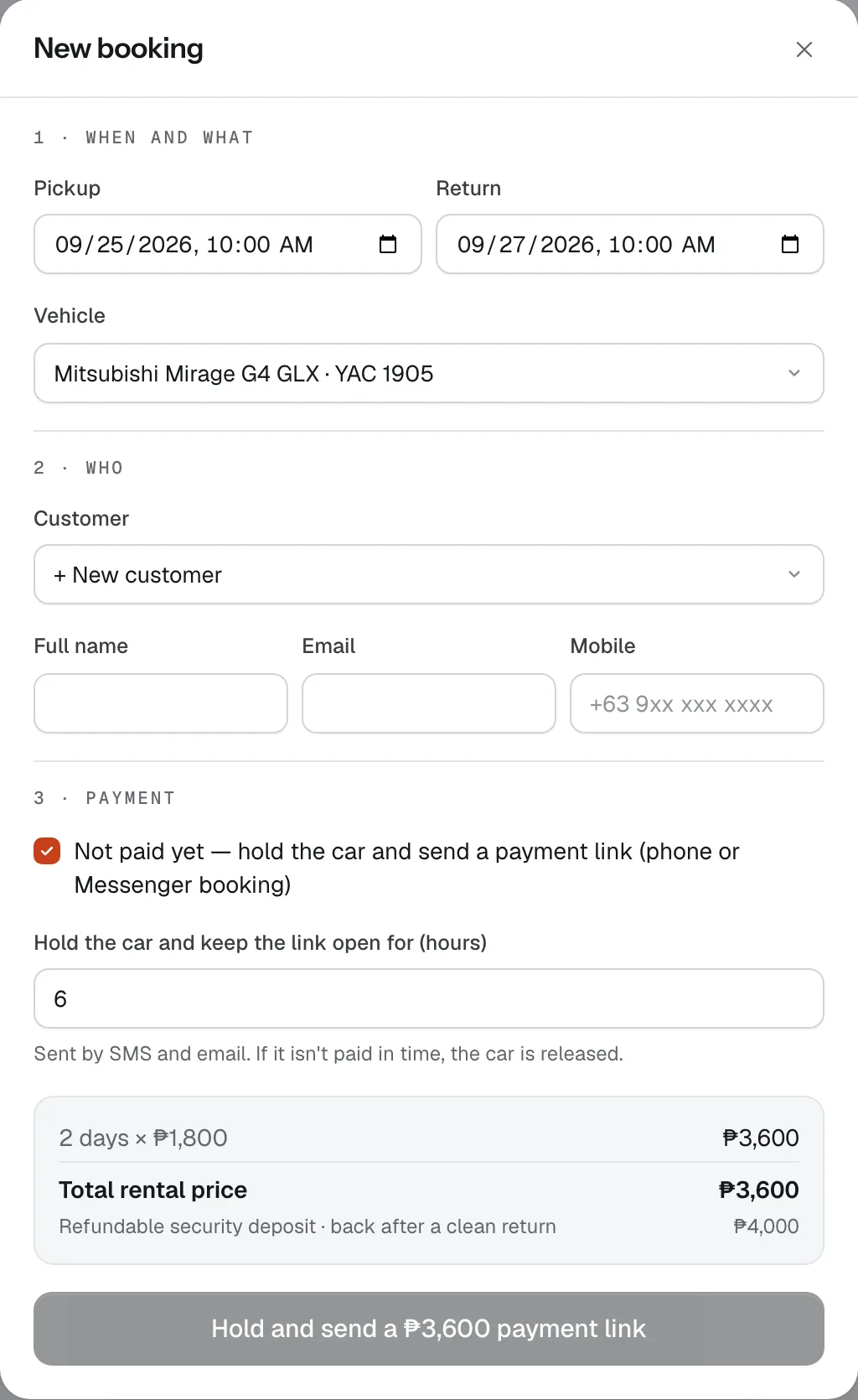
- Not paid yet
- Hours the car is held
- Hold and send the link

Good to know
- Prices in the auto-reply are all-in for pickup at your branch, without add-ons or delivery. The renter sees the exact total, extras included, before paying.
- Dates in a chat assume pickup at 10 AM. The renter can change the time on your site before booking.
- Post your booking link on your Facebook page too, so people can book without messaging at all — see Design and publish your booking site.
Stuck on a step?
A person answers, in Filipino or English — Mon–Sat, 8:00–20:00 PHT.
- Get paid: online, by link and at the counterConnect your Xendit account, let renters pay by GCash, Maya, card, QR Ph or over the counter, take chat and phone bookings with a payment link, collect the rest at the desk and send refunds.15 min
- Design and publish your booking sitePick a theme, edit your site in a draft, send a preview, publish when it's right — then add languages, your own domain or a widget, and share the link.25 min
- Your first pickup, step by stepApprove the renter's licence, collect what's owed, get the agreement signed, photograph the vehicle and hand over the keys — with a record you and the renter both agreed to.12 min